

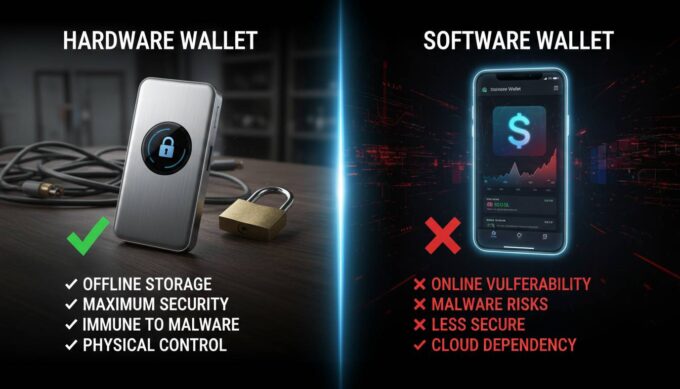
Cold storage Bitcoin wallets represent the gold standard for cryptocurrency security, offering protection against online threats that have resulted in billions of dollars in losses over the past decade. Unlike hot wallets connected to the internet, cold storage keeps your private keys completely offline, making them virtually immune to hacking, phishing, and malware attacks that plague connected wallets.
If you’re holding significant amounts of Bitcoin or plan to accumulate more than you can afford to lose, understanding cold storage isn’t optional—it’s essential. This guide covers everything you need to know about securing your cryptocurrency with cold storage solutions, from fundamental concepts to practical implementation.
Understanding Cold Storage: The Foundation of Bitcoin Security
Cold storage refers to any method of storing cryptocurrency private keys in an environment disconnected from the internet. The core principle is simple: by keeping your keys offline, you eliminate the primary attack vector that hackers exploit. When your Bitcoin is in cold storage, transactions require manual signing on an offline device, meaning even if someone compromises your computer or obtains your public address, they cannot access your funds without physical access to your cold storage device.
The security model relies on isolation. Hot wallets—software wallets, exchange accounts, and mobile apps—maintain constant internet connectivity, creating exposure to remote attacks. According to industry data from blockchain security firms, over $3 billion in cryptocurrency has been stolen through exchange hacks and hot wallet compromises since 2012. Cold storage directly addresses this vulnerability by removing the online attack surface entirely.
For long-term Bitcoin holders, often called “HODLers,” cold storage isn’t just recommended—it’s the standard practice. The phrase “not your keys, not your crypto” has become a foundational principle in the Bitcoin community, emphasizing that keeping your private keys in your possession through cold storage is the only way to truly own your Bitcoin.
Types of Cold Storage Solutions: Comparing Your Options
Several cold storage methods exist, each with distinct security characteristics, usability trade-offs, and cost considerations. Understanding these differences helps you choose the right solution for your situation.
Hardware Wallets
Hardware wallets are specialized physical devices designed exclusively for cryptocurrency key management. They store private keys in secure enclaves—dedicated chips incapable of exporting the keys—even when connected to compromised computers. The device screens display transaction details, requiring physical button confirmation before signing any transaction.
Leading hardware wallets currently available:
| Device | Price | Security Features | Companion App |
|---|---|---|---|
| Ledger Nano X | $149 | Secure element, PIN, passphrase | Ledger Live |
| Trezor Model T | $239 | Open-source, touchscreen, PIN | Trezor Suite |
| Coldcard Mk4 | $169 | Bitcoin-only, air-gapped, duress PIN | Coinkite |
| Foundation Passport | $399 | Air-gapped, entropy source, premium build | Passport app |
Hardware wallets balance security with usability. They work with most computers, support multiple cryptocurrencies beyond Bitcoin, and include backup recovery options through seed phrases.
Paper Wallets
A paper wallet is simply your private key and corresponding public address printed on paper. Generated offline using specialized software, paper wallets exist entirely in physical form—no digital footprint means no digital attack surface. The concept emerged early in Bitcoin history and remains valid when properly executed.
However, paper wallets present significant practical challenges. Physical damage from water, fire, or simple loss can permanently destroy access to funds. The paper must be stored securely, and anyone who obtains the paper gains access to the funds. For these reasons, paper wallets suit technically sophisticated users who understand the trade-offs rather than beginners seeking simplicity.
Creating a secure paper wallet requires generating keys on an air-gapped computer using reputable software, verifying the software checksum, printing with a dedicated printer (not a network-connected one), and storing the paper in multiple secure locations.
Steel Wallets
Steel wallets represent an evolution of paper wallets, engraving seed phrases into metal plates resistant to fire, water, and physical damage. Products like Cryptosteel, Billfodl, and DIY solutions using stainless steel plates protect against the primary weakness of paper—vulnerability to physical destruction.
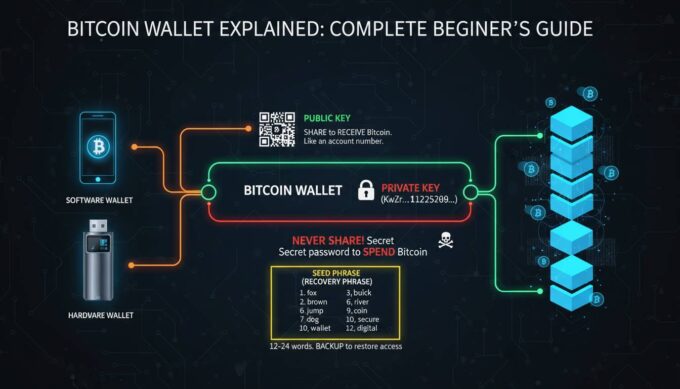
The seed phrase—the list of words representing your private key—gets arranged on stainless steel tiles locked into a frame. Even in catastrophic scenarios like house fires that destroy paper documents, steel wallets survive, preserving access to your Bitcoin.
Air-Gapped Computers
For maximum security with moderate technical complexity, dedicated air-gapped computers store Bitcoin keys completely offline. These machines never connect to the internet, running only software necessary for transaction signing. The process involves creating unsigned transactions on an online computer, transferring them via USB to the air-gapped machine for signing, then moving the signed transaction back to the internet-connected device for broadcasting.
This approach provides exceptional security but demands technical competence and ongoing operational security discipline. The air-gapped machine must remain isolated, meaning no wireless cards, no ethernet ports, and strict controls on what software gets installed.
Why Cold Storage Matters: Understanding the Threat Landscape
The cryptocurrency security landscape has evolved dramatically since Bitcoin’s inception. Understanding the specific threats cold storage protects against clarifies why it’s essential for serious Bitcoin holders.
Hot wallet vulnerabilities include phishing attacks where criminals create fake websites or emails tricking users into revealing seeds, malware that logs keystrokes or takes screenshots of wallet screens, exchange breaches where centralized services get hacked, and SIM swapping where attackers hijack phone numbers to bypass two-factor authentication.
The scale of these threats is staggering. Major exchange hacks have resulted in losses exceeding $400 million in single incidents. Individual users face constant attempts—research indicates cryptocurrency holders receive an average of several phishing attempts monthly, with sophisticated campaigns targeting known wallet holders.
Beyond external threats, cold storage provides protection against your own mistakes. Accidentally sharing seed phrases, installing compromised software, or falling for scams becomes irrelevant when your actual keys never touch an internet-connected device. The separation between your holdings (cold storage) and your spending money (hot wallet) creates a security boundary that limits damage from any single compromise.
For institutional investors and high-net-worth individuals, cold storage satisfies fiduciary requirements and audit standards that demand specific security controls. Custody solutions offered by regulated entities almost universally employ cold storage as the foundation of their security architecture.
Setting Up Cold Storage: A Practical Guide
Implementing cold storage requires careful attention to procedure. The following framework covers establishing hardware wallet security—the most common approach for most users.
Preparation Phase
Before purchasing or setting up any cold storage solution, prepare your environment. Use a computer free of malware—ideally a freshly installed operating system. Disable any automatic cloud backup services that might transmit your seed phrase. Prepare your recovery options: purchase a steel wallet for seed phrase backup, identify secure physical locations for storage, and plan for contingency scenarios like losing access to your primary device.
Device Initialization
When you receive your hardware wallet, verify the packaging hasn’t been tampered with—manufacturers include holographic seals or serial number verification. Initialize the device by powering it on and following the on-screen setup process. Create a PIN that meets minimum complexity requirements—typically four to eight digits.
The critical step is seed phrase generation. Your device will display a series of words (typically 12 or 24). Write these down on paper first, verifying each word’s order carefully. Mistake rates during initial backup are surprisingly high, and errors here mean permanent fund loss.
Seed Phrase Backup
Transfer your seed phrase to permanent storage immediately. Use a steel wallet product rather than paper—this protects against physical disasters. When recording words, double-check each word number matches your list position. Many users write words 1-12 on one line and 13-24 on another, then verify against the device display.
Create multiple backup copies stored in separate physical locations. A common practice involves keeping one backup at home in a secure location (safe or lockbox) and another at a trusted person’s residence or bank safety deposit box. This provides redundancy against both theft and physical disaster while maintaining geographic distribution.
Verification Testing
Before transferring significant amounts, test your setup with small transactions. Send a tiny amount of Bitcoin to your cold storage address, verify receipt, then send a test transaction back. This confirms your recovery process works correctly and familiarizes you with the transaction signing workflow.
Security Best Practices: Protecting Your Cold Storage
Acquiring cold storage is only the beginning—ongoing operational security determines whether your protection remains effective.
Physical security matters more for cold storage than any other asset class. Your hardware wallet PIN and seed phrase together control your Bitcoin. Store these separately: the device in one secure location, seed phrase backups in others. Never store both in the same place. Consider that anyone with physical access to your device plus knowledge of your PIN can drain your wallet.
Purchase security is frequently overlooked. Buying hardware wallets from third-party sellers on marketplaces carries substantial risk—devices can arrive compromised, with modified firmware. Always purchase directly from manufacturers or authorized resellers. Verify the device serial number matches manufacturer records when possible.
Firmware updates require careful handling. Manufacturers periodically release security patches. Update your device firmware, but download updates only from official sources, verify checksums, and understand that update processes represent moments of elevated risk where you’ll connect your device to a computer.
Transaction discipline prevents costly mistakes. Always verify transaction details on the device screen—confirm the recipient address and amount match what you intended. Malware on your computer can alter addresses you copy from the clipboard, displaying one address while sending to another. The hardware wallet display shows the actual destination, providing protection against clipboard swapping attacks.
Common Mistakes to Avoid
Even experienced users make critical errors when implementing cold storage. Understanding these pitfalls helps you avoid them.
| Mistake | Consequence | Prevention |
|---|---|---|
| Single-location seed storage | Fire, theft, or disaster destroys all access | Distribute backups across multiple secure locations |
| Purchasing used hardware wallet | Device may be compromised or tampered with | Only buy new, sealed devices from authorized sellers |
| Recording seed phrase digitally | Computer compromise exposes keys | Use only paper or steel, never digital storage |
| Skipping verification testing | Discovering problems only during real emergencies | Test with small amounts before storing significant funds |
| Sharing seed phrase with others | Anyone with phrase can empty wallet | Never share seed phrase, even with “support” representatives |
| Storing seed with device | Single theft loses everything | Separate storage: device and seeds in different locations |
The most expensive mistakes often involve assumptions—believing a particular storage location is secure, that a purchased device is genuine, or that a written-down phrase remains legible after years. Verify everything, test regularly, and maintain redundancy.
Cost Analysis: Investing in Security
Cold storage requires upfront investment, but this cost is minimal relative to the value it protects.
| Solution | Initial Cost | Longevity | Cost Per Year (5-year span) |
|---|---|---|---|
| Hardware Wallet (Ledger) | $149 | 5-10 years | $15-30 |
| Hardware Wallet (Trezor) | $239 | 5-10 years | $24-48 |
| Steel Wallet Backup | $50-100 | Lifetime | $5-10 |
| Paper Wallet | $5-10 | 5-10 years (risk) | $1-2 |
| Bank Safety Deposit Box | $200-400/year | Ongoing | $200-400 |
For most users holding more than $1,000 in Bitcoin, hardware wallet costs represent sensible insurance. The price of a single hardware wallet—comparable to premium smartphone insurance or comprehensive auto coverage—protects against losses that could devastate your finances.
The Future of Cold Storage
Bitcoin custody technology continues evolving. Multi-signature arrangements allow multiple keys controlling access, enabling scenarios like requiring two of three keys to authorize transactions—protecting against single points of failure and enabling estate planning. Institutional custody solutions now combine cold storage with insurance and regulatory compliance, bringing enterprise-grade security to individual investors through products like Fidelity’s custody offering and specialized custodians.
The fundamental principle remains unchanged: private keys held in offline storage provide the strongest available protection against digital theft. As Bitcoin’s value increases and attack sophistication grows, cold storage becomes progressively more important for anyone holding meaningful amounts.
Frequently Asked Questions
How much Bitcoin should I keep in cold storage?
Keep any Bitcoin you don’t plan to spend soon in cold storage. A common approach is maintaining a small hot wallet for daily transactions ($500-2,000 equivalent) while keeping the majority of holdings in cold storage. The exact split depends on your spending patterns and risk tolerance.
Can cold storage Bitcoin be hacked?
While theoretically possible through physical access to the device combined with PIN extraction, practical attacks on properly implemented cold storage are extraordinarily difficult. The primary vulnerabilities are human error—sharing seed phrases, purchasing compromised devices, or falling for phishing—rather than technical break-ins to the hardware itself.
What happens if I lose my hardware wallet?
Your Bitcoin isn’t lost. The seed phrase backup allows complete wallet recovery on a new device or compatible software. This is why secure seed phrase storage is critical—your hardware wallet is simply an interface; the seed phrase is your actual keys.
Should I buy a used hardware wallet to save money?
Never buy used hardware wallets. There’s no way to verify they haven’t been tampered with or that the previous owner didn’t record the seed phrase. Only purchase new, sealed devices directly from manufacturers or authorized resellers.
How often should I check my cold storage Bitcoin?
Check your holdings periodically—monthly or quarterly—to verify you still have access and the address balance is correct. Beyond checking, don’t touch cold storage frequently. Less movement reduces opportunity for mistakes and maintains the security boundary between your cold funds and internet-connected devices.
Is paper wallet still a viable option?
Paper wallets work when created properly on air-gapped machines, but they carry significant drawbacks compared to hardware wallets. Paper degrades, can be lost or destroyed, and offers no protection if someone physically obtains the paper. For most users, hardware wallets provide superior security with better usability.
Conclusion
Cold storage remains the definitive solution for securing meaningful Bitcoin holdings. Whether you choose hardware wallets for their balance of security and usability, steel-encased seed phrases for permanent backup, or air-gapped computers for maximum protection, the principle is the same: keep your private keys offline and under your physical control.
The implementation cost—typically under $200 for quality hardware plus backup solutions—is negligible insurance against losses that have devastated countless cryptocurrency holders. As Bitcoin continues gaining mainstream acceptance and value, the security practices outlined here become increasingly vital.
Start with a hardware wallet from a reputable manufacturer, create proper seed phrase backups in steel, verify everything works with test transactions, and maintain the discipline of keeping your keys offline. Your future self—the one holding Bitcoin that has potentially appreciated substantially—will thank you for taking these steps today.






Leave a comment